

A kitchen that works from paper tickets and verbal callouts makes small errors every day: a missed modifier, a wrong size, a ticket read twice and remade. Over a week those small errors add up in wasted food and remade dishes, and each remake takes time and stock. A kitchen display system replaces that guesswork by showing every order on a shared screen in the same format every time. This article focuses on how that change improves accuracy and cuts waste in practice, and what to check before you put one in. The sections below walk through accuracy, screen layout, waste, the POS hand-off and the running cost. If you run a busy kitchen, the parts worth reading most closely are the ones about the screen and the hand-off.
How a kitchen display system reduces order errors
A kitchen display system presents each order in a clear, consistent layout, so the kitchen reads the same information every time. Modifiers are shown as separate lines, and the order moves through a fixed sequence from new to in progress to done. That structure removes most of the misreading that happens with handwriting or rushed callouts. Because the ticket is digital, the item that reaches the pass matches what the customer actually chose. The fewer steps between the till and the plate, the fewer places for an error to slip in. The result is a steadier pass and fewer plates sent back, which staff notice as soon as the routine settles. Even the busiest line moves more calmly when everyone reads from the same screen, and that calm is part of accuracy too.
Why the kitchen display screen makes orders easier to read
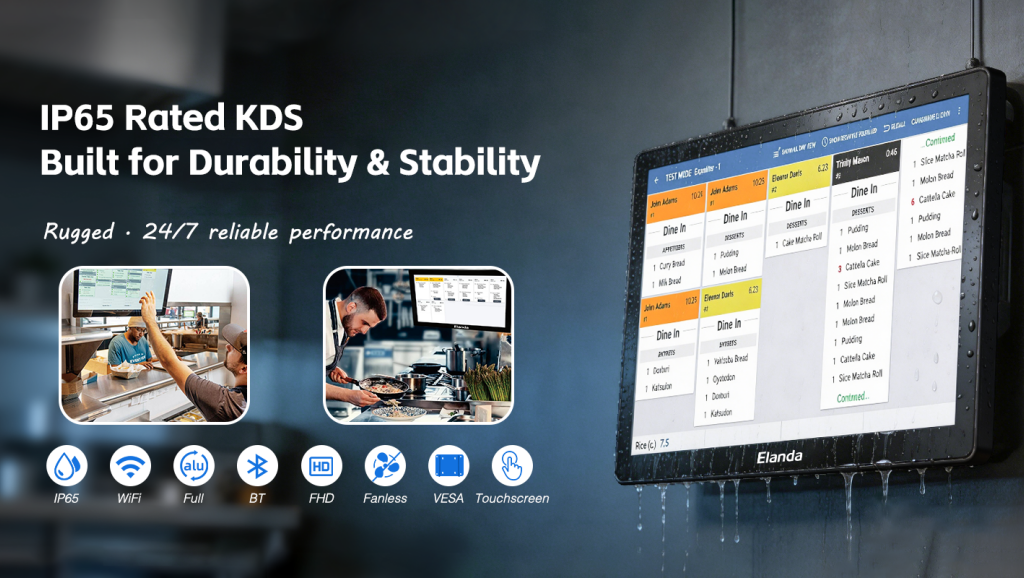
The kitchen display screen is where accuracy is won or lost. It should be large enough to read from across the line, with clear separations between open orders and an obvious way to mark each one done. Brightness and placement matter too, because a screen that is hard to see at a glance invites mistakes. A well-set screen keeps the kitchen moving without anyone stopping to squint at a ticket. These are small details, but they decide whether the screen is trusted or ignored. A screen that staff read without thinking is the one that actually prevents errors, and it quickly becomes the natural focus of the line.
How a restaurant kds system cuts food waste in the kitchen
A restaurant kds system reduces waste in two ways. First, it shortens the time an order waits before it is seen, so dishes are not started late or made twice. Second, it gives the kitchen a single view of what is actually being prepared, which stops duplicate batches when tickets pile up. Waste also drops because portion notes and modifiers are shown clearly, so the kitchen follows the recipe rather than guessing. For busy services, that is often the difference between a clean pass and a tray of remade dishes, which is why the waste saving is usually visible within the first few weeks. Once the team trusts the screen, the flow settles and the stock stays closer to the plan. This is where the return on the system shows up most clearly.
How pos with kitchen display keeps the ticket accurate
The accuracy of the kitchen depends on the hand-off from the front. pos with kitchen display means the order taken at the counter or on a kiosk appears on the screen with no retyping, so what the customer chooses is exactly what the kitchen prepares. Removing that second entry point closes the gap where most order errors are introduced, and it keeps the front and the kitchen on the same page. When the hand-off is automatic, there is no second chance for a typo, and no need to rewrite a ticket at the pass. The order stays the same from screen to plate.
What a kitchen display system needs to work well
A kitchen display system only helps if it fits the kitchen. Confirm that it connects to your existing POS, that the screen layout matches the way your team works, and that the hardware can handle the heat, steam and grease of a working kitchen. Ask how new menu items are added and how long the screen takes to boot. The system should support the kitchen, not add a second job of keeping it running. A screen that crashes at the busiest moment is worse than no screen at all, and a slow boot at the start of service is a problem you feel every day.Reliability is the point, so test the setup in a real shift before you roll it out across the kitchen, and confirm the support process for faults before they happen.
Measuring the return of a kitchen display system
The return on a kitchen display system shows up in fewer remade dishes, less wasted stock and a steadier service. Count the cost of the hardware, installation and any software fees, then compare that against the dishes you remake in a normal week. Where mistakes are frequent, the payback is usually quick; where the kitchen already runs cleanly, the gain is smaller. A simple before-and-after count of remade dishes gives the clearest measure, and it is easy to track without extra software. Where the kitchen runs cleanly already, the gain is smaller and the decision should reflect that. Either way, tracking the first month gives you the real number to work from, and it makes the case easy to explain to the rest of the team.
Working with a supplier of kitchen display system hardware
A dependable supplier of kitchen display system hardware should help you match the screen to your kitchen, software and order flow. Ask about screen size, durability, warranty and spare parts, and whether OEM/ODM customisation is available. A supplier that checks your ticket layout before recommending a unit is usually the more reliable partner, because it fits the system rather than just the screen. That kind of back-and-forth is normal and useful, and it reveals more than a spec sheet. Together these checks give you a shortlist you can trust, and they prevent most problems before the screens arrive.
Elanda, founded in 2016 in Shenzhen, China, is a global POS and self-service solution provider. The company supplies self service kiosks, POS terminals, KDS and peripherals to retail, hospitality, banking, logistics, healthcare and other industries worldwide, with a focus on reliable hardware, distinctive design and responsive support. OEM/ODM customisation is available for distributors, software providers and system integrators. Across every project, the aim is the same: hardware that fits the kitchen, the software and the way the team actually works, so the screen earns its place from the first service. Choosing the right unit is what turns the setup into a daily advantage, and it starts with asking the right questions.
If you are planning a kitchen display system rollout and want to confirm the right screen for your kitchen and POS, our team can help you match the hardware to your order flow before you place an order. Tell us how you take tickets today, and we will point you to the right configuration. A short conversation about your kitchen is usually enough to match the screen to the way you work, and to confirm the integration path before anything is ordered.
