

Modern restaurants receive orders from more channels than ever before. Customers may order at the counter, through a waiter, from a self-service kiosk, via QR code, or through an online ordering platform. Getting all of those orders into the kitchen quickly and accurately can become difficult, especially during busy service periods.
This is where a KDS, or Kitchen Display System, comes in.
A KDS replaces or supplements traditional printed kitchen tickets with digital screens that show incoming orders directly to kitchen staff. Connected with a restaurant POS system, it helps kitchens organize orders, track preparation progress, reduce communication errors, and improve service speed.
For restaurants, cafés, fast-food outlets, food courts, and other foodservice businesses, a well-designed Kitchen Display System can become an important part of daily kitchen operations.
What Does KDS Mean?
KDS stands for Kitchen Display System.
It is a digital order management system used in commercial kitchens to display orders received from a POS system, self-service kiosk, online ordering platform, or other ordering channel.
Instead of sending every order to a kitchen printer, the order appears on a screen installed at the relevant kitchen workstation.
The screen may show information such as:
● Order number
● Ordered items
● Quantity
● Product modifiers
● Special preparation instructions
● Dine-in or takeaway status
● Order time
● Preparation time
● Order priority
● Current order status
Kitchen staff can then prepare the order and update its status as it moves through the kitchen.
In simple terms, a KDS helps connect the front of house with the back of house.
How Does a Kitchen Display System Work?
A typical restaurant KDS workflow starts when a customer places an order.
1. The Customer Places an Order
An order may come from several sources, including:
● Restaurant POS terminal
● Waiter ordering system
● Self-service kiosk
● Mobile ordering system
● QR code ordering
● Online ordering platform
The order information is entered into the restaurant’s POS or ordering software.
2. The Order Is Sent to the Kitchen
Once confirmed, the system automatically sends the order to the appropriate Kitchen Display System.
Instead of relying on staff to verbally communicate an order or carry a printed ticket into the kitchen, order data can be transmitted electronically.
This can reduce delays between order placement and food preparation.
3. Orders Are Routed to the Correct Station
In larger kitchens, different dishes may be prepared at different stations.
For example:
● Burgers → Grill station
● French fries → Fry station
● Salads → Cold preparation station
● Drinks → Beverage station
● Desserts → Dessert station
A properly configured KDS can display relevant items at each workstation rather than showing every item to every kitchen employee.
This keeps each screen focused and makes busy kitchens easier to manage.
4. Kitchen Staff Prepare the Order
Kitchen employees can view orders in real time and process them according to priority.
Many KDS software systems can use visual indicators or timers to show how long an order has been waiting.
This helps employees identify delayed orders and maintain a more consistent preparation flow.
5. Order Status Is Updated
After an item or complete order is prepared, staff can mark it as completed.
Depending on the restaurant software, the updated status may also be visible to front-counter employees, servers, pickup staff, or other connected systems.
This creates a more transparent order process from checkout to food pickup.
What Are the Main Functions of a KDS?
A Kitchen Display System is more than simply a screen displaying food orders. Its real value comes from improving how information moves through the kitchen.
Real-Time Order Display
Orders can appear on kitchen screens immediately after they are confirmed.
Kitchen employees do not need to wait for printed tickets to arrive or depend on verbal instructions from front-of-house staff.
Order Prioritization
Orders can be arranged according to time, service type, or other predefined rules.
During peak periods, this helps kitchen teams understand what needs to be prepared first.
Kitchen Station Routing
Different menu items can be directed to different preparation stations.
This is particularly useful for restaurants with large menus or multiple cooking areas.
Preparation Time Tracking
Many KDS solutions include timers that show how long an order has been in preparation.
Managers can use this information to identify delays and improve kitchen workflows.
Order Status Management
Orders can move through different stages such as:
New → Preparing → Ready → Completed
This gives both kitchen and front-of-house teams better visibility into each order.
Special Instruction Display
Customer requests such as:
● No onions
● Extra cheese
● Well done
● No ice
● Allergy notes
● Takeaway packaging
can be clearly displayed together with the order.
This reduces the possibility that important instructions are missed.
What Are the Benefits of Using a KDS in a Restaurant?
The main purpose of a KDS is to make kitchen operations more organized and efficient.
Fewer Order Errors
Handwritten notes, verbal communication, and misplaced paper tickets can all lead to mistakes.
A digital KDS receives order information directly from the connected ordering system, helping ensure that kitchen staff see the same order information entered at the point of sale.
Faster Kitchen Communication
With a POS and KDS integrated system, there is no need for employees to repeatedly walk between the counter and kitchen to check order status.
Information can move electronically between different areas of the restaurant.
Better Order Visibility
During busy lunch or dinner periods, dozens of orders may enter the kitchen within a short time.
A KDS gives staff a structured overview of:
● Incoming orders
● Current orders
● Waiting time
● Completed orders
This can make peak-hour operations easier to manage.
Less Dependence on Paper Tickets
Traditional kitchen printers require receipt paper, printer maintenance, and regular replacement of consumables.
A digital Kitchen Display System can reduce reliance on printed tickets and create a cleaner kitchen workflow.
Improved Kitchen Coordination
When each preparation station receives relevant information, kitchen staff can work simultaneously rather than waiting for one paper ticket to pass between stations.
This is particularly valuable in high-volume restaurants.
KDS vs. Kitchen Printer: What Is the Difference?
Both kitchen printers and Kitchen Display Systems can transmit restaurant orders to the kitchen, but they operate differently.
| Feature | Kitchen Display System | Kitchen Printer |
|---|---|---|
| Order Format | Digital screen | Printed ticket |
| Real-Time Updates | Yes | Limited |
| Order Status Tracking | Available | Usually manual |
| Preparation Timer | Available | Usually unavailable |
| Station Routing | Flexible | Printer-based routing |
| Paper Required | No | Yes |
| Order Reorganization | Easy | Difficult |
| Historical Workflow Data | Possible through software | Limited |
A kitchen printer can still be suitable for small restaurants with simple order volumes.
A restaurant KDS, however, becomes increasingly useful when businesses handle high order volumes, multiple kitchen stations, self-service ordering, or several digital sales channels.
Some restaurants also use both systems together as part of a hybrid workflow.
What Types of Restaurants Can Use a KDS?
Kitchen Display Systems are suitable for many foodservice environments.
Quick-Service Restaurants
Fast-food businesses need to process a large number of orders within short periods.
KDS screens can help organize incoming orders and keep preparation time visible.
Full-Service Restaurants
Waiter-entered orders can be sent directly from the POS system to the kitchen, helping improve communication between servers and chefs.
Cafés and Coffee Shops
Orders generated from POS terminals or self-service kiosks can be sent directly to preparation screens for drinks, snacks, and food.
Food Courts
Food court operators often process high volumes of quick-turnaround orders. Digital order displays can simplify communication and queue management.
Takeaway and Delivery Restaurants
Restaurants handling dine-in, takeaway, and delivery orders simultaneously can use a KDS to organize orders from different channels.
Restaurant Chains
For multi-location restaurant brands, standardized POS and KDS hardware can help create more consistent workflows across different stores.
How Does a KDS Work with a Self-Service Kiosk?
Self-service ordering is becoming increasingly common in fast-food restaurants, cafés, food courts, and other high-volume foodservice locations.
The typical workflow is:
Customer → Self-Service Kiosk → POS/Ordering System → KDS → Kitchen
After customers select their food and complete the ordering process at the kiosk, the order can be automatically transmitted to the kitchen.
This removes the need for restaurant employees to manually enter the same order again.
Combining self-service kiosks, POS terminals, and Kitchen Display Systems can therefore create a more connected restaurant ordering environment.
What Should You Look for in KDS Hardware?
The software controls how orders are processed, but hardware is equally important because KDS terminals operate in demanding kitchen environments.
When selecting KDS hardware, consider the following factors.
Screen Size and Visibility
Kitchen employees should be able to read orders quickly from a practical working distance.
Larger displays can show more order information simultaneously, which can be useful for busy commercial kitchens.
Touchscreen Operation
A responsive touchscreen allows employees to interact with orders directly, such as changing order status or completing tickets.
Water and Dust Resistance
Commercial kitchens may expose equipment to:
● Water splashes
● Oil
● Steam
● Food particles
● Dust
● Frequent cleaning
For this reason, an IP-rated Kitchen Display System can offer an advantage in demanding foodservice environments.
Fanless Design
Kitchen environments may contain grease and airborne particles.
Fanless hardware reduces the need for external cooling fans that can draw contaminants into the equipment while also providing quieter operation.
Easy-to-Clean Housing
KDS hardware should have a practical surface design that allows kitchen staff to clean equipment regularly.
POS Software Compatibility
The KDS terminal must be compatible with the restaurant’s operating system, POS software, and kitchen management software.
For system integrators and restaurant projects, hardware compatibility should always be confirmed before deployment.
KDS Hardware for Modern Commercial Kitchens
As restaurants continue adopting POS terminals, self-service kiosks, online ordering, and digital kitchen management, the KDS has become an important link between ordering and food preparation.
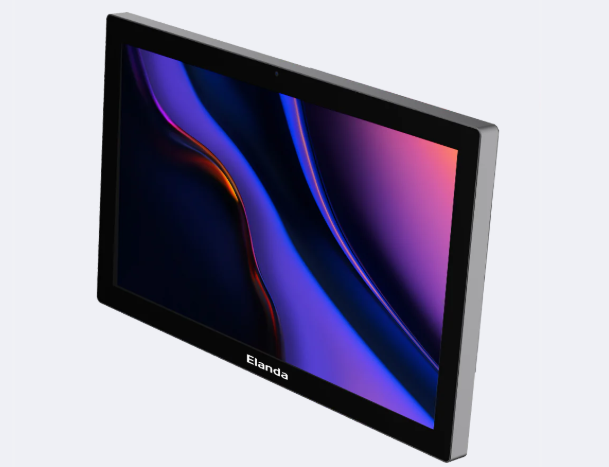
Elanda provides POS, self-service kiosk, and KDS hardware designed for commercial foodservice environments.
For example, the Elanda KD22 Kitchen Display System features a 21.5-inch display, fanless design, and IP65-rated protection, making it suitable for demanding commercial kitchen installations.
When selecting hardware for a restaurant project, businesses should consider not only processing performance but also screen visibility, mounting requirements, environmental protection, software compatibility, and long-term reliability.
Frequently Asked Questions About KDS
What does KDS stand for in restaurants?
KDS stands for Kitchen Display System. It digitally displays customer orders in the kitchen and helps staff organize, prepare, and track them.
Does a KDS replace a kitchen printer?
It can. Many restaurants use KDS screens instead of printed kitchen tickets, while others use KDS and kitchen printers together depending on their workflow.
Does a KDS need to connect to a POS system?
In most restaurant environments, yes. The KDS normally receives order information from a POS system, ordering platform, or related restaurant management software.
Can a self-service kiosk connect to a KDS?
Yes. Orders placed through a self-service kiosk can be passed through the restaurant ordering or POS system and displayed directly on a KDS.
Is a KDS only for fast-food restaurants?
No. Kitchen Display Systems can be used in quick-service restaurants, full-service restaurants, cafés, bakeries, food courts, takeaway businesses, and many other foodservice operations.
Final Thoughts
A Kitchen Display System turns restaurant order information into a clear digital kitchen workflow.
Instead of relying entirely on paper tickets or verbal communication, restaurants can send orders directly from the POS, self-service kiosk, or ordering platform to kitchen screens. Kitchen staff can then view order details, monitor preparation time, manage priorities, and update order status in real time.
For restaurants processing high order volumes or operating multiple ordering channels, a reliable KDS system can help improve order visibility, reduce communication errors, and create a more efficient connection between front-of-house and kitchen operations.
As restaurant technology becomes increasingly connected, combining POS terminals, self-service kiosks, and Kitchen Display Systems provides a practical foundation for faster and more organized foodservice operations.
