

Windows POS terminals remain a popular choice for retailers, restaurants, hotels and other businesses that need stable performance, broad software compatibility and flexible peripheral connectivity. Unlike a basic electronic cash register, a Windows POS terminal combines a touchscreen computer, POS software and connected devices into one integrated transaction management system.
However, Windows POS terminals are available with different processors, screen sizes, interfaces and installation structures. Choosing the correct configuration requires more than simply comparing appearance and price.
This guide explains how Windows POS terminals work, their main advantages, common applications and the key specifications buyers should evaluate before placing an order.
What Is a Windows POS Terminal?
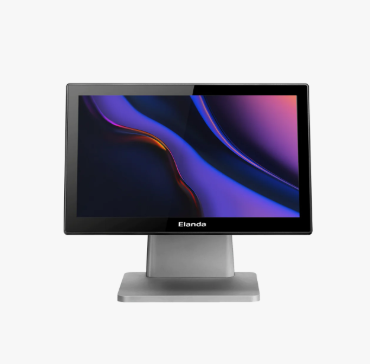
A Windows POS terminal is a commercial touchscreen computer that runs a Microsoft Windows operating system and is used to process sales transactions and manage daily business operations.
Depending on the software installed, a Windows POS system may support:
- Product and price management
- Barcode scanning
- Order entry
- Payment processing
- Receipt printing
- Inventory tracking
- Employee management
- Customer loyalty programs
- Sales reporting
- Accounting or ERP integration
- Multi-store data synchronization
Microsoft identifies point-of-sale terminals as one of the common fixed-purpose applications for Windows IoT Enterprise. The operating system provides a familiar Windows environment while supporting enterprise-level device management and commercial software deployment.
A complete Windows POS setup usually includes the main POS terminal, POS software and several optional peripherals, such as a barcode scanner, receipt printer, cash drawer, customer display, magnetic stripe reader or payment terminal.
How Does a Windows POS Terminal Work?
The POS terminal acts as the central control unit of the checkout system.
When a cashier scans a product or selects an item on the touchscreen, the POS software retrieves the corresponding information from a local or cloud-based database. The system then calculates the price, discount, tax and total amount.
After the customer completes payment, the terminal can:
- Record the transaction.
- Update inventory quantities.
- Open the cash drawer.
- Print or send a digital receipt.
- Update customer loyalty information.
- Synchronize the data with accounting or ERP software.
- Send sales information to a central management platform.
Some Windows POS systems can continue processing transactions when the internet connection is interrupted. The data is stored locally and synchronized after the connection is restored. Whether this function is available depends primarily on the POS software rather than the terminal hardware alone.
Main Advantages of Windows POS Terminals
Broad POS Software Compatibility
One of the main reasons businesses choose Windows POS terminals is software compatibility.
Many established retail, restaurant, hotel and inventory management applications are developed specifically for Windows. This makes a Windows POS machine suitable for companies that already use Windows-based software or require integration with existing ERP, CRM or accounting platforms.
Businesses can also install proprietary POS applications, provided that the software is compatible with the selected Windows version and hardware configuration.
Flexible Peripheral Integration
A commercial POS system may need to connect with several devices at the same time. Windows POS terminals commonly provide USB, serial, LAN, display and cash-drawer interfaces to support different checkout environments.
Microsoft Windows supports multiple point-of-service device categories, including barcode scanners, cash drawers, customer displays, magnetic stripe readers and receipt printers. Support can be provided through built-in standards, OPOS service objects or manufacturer-specific drivers.
Before purchasing, buyers should still confirm that each peripheral is compatible with the POS software, operating system, driver and physical connection interface.
Familiar Operating Environment
Employees and IT teams are often already familiar with Windows. This can simplify software installation, network configuration, user management and troubleshooting.
For businesses operating multiple stores, Windows devices may also be easier to integrate into an existing IT management environment.
Multiple Hardware Configurations
Windows POS terminals are available with a broad range of processors, memory capacities and storage options. Buyers can select a cost-effective configuration for basic checkout operations or a higher-performance configuration for demanding applications.
Common processor choices include:
- Intel Celeron or equivalent entry-level processors
- Intel N-series processors
- Intel Core i3 processors
- Intel Core i5 processors
- Higher-performance processors for specialized applications
This flexibility allows distributors and system integrators to configure the hardware according to the software workload and target market.
Suitable for Fixed-Purpose Commercial Use
Windows IoT Enterprise is designed for fixed-purpose devices such as POS terminals, kiosks and digital signage systems. Its Long-Term Servicing Channel is intended for applications where functionality should remain consistent over an extended operating period.
This is particularly valuable for businesses that prefer a stable operating environment and do not want frequent feature changes to interrupt store operations.
Windows POS Terminal vs Android POS Terminal
Both Windows and Android POS terminals can support modern retail and hospitality applications. The better choice depends on the software, peripherals and operational requirements.
| Comparison | Windows POS Terminal | Android POS Terminal |
|---|---|---|
| Software ecosystem | Suitable for traditional desktop and enterprise POS software | Suitable for mobile and app-based POS software |
| Hardware configuration | Broad selection of processors, RAM and storage | Usually based on ARM platforms |
| Peripheral compatibility | Strong support for legacy and commercial peripherals | Depends more heavily on application and device support |
| System customization | Suitable for complex software and enterprise integration | Suitable for streamlined and lightweight applications |
| Common applications | Supermarkets, restaurants, hotels and specialty retail | Small shops, mobile checkout and cloud-based systems |
| IT management | Familiar to many enterprise IT teams | Often simpler for app-based deployment |
| Initial cost | May be higher depending on configuration | Often more economical for basic applications |
A Windows POS terminal is generally the better option when the business depends on existing Windows software, serial-port peripherals, local databases or complex system integration.
An Android POS terminal may be more appropriate when the business uses a lightweight cloud application and requires a simple, app-oriented user experience.
Important Specifications to Consider
1. Processor
The processor determines how efficiently the terminal can run POS software, reporting tools and background applications.
An entry-level processor may be sufficient for basic billing and receipt printing. A Core i3 or Core i5 processor is more appropriate when the system must handle:
- Large product databases
- Multiple software applications
- Advanced inventory management
- Customer-facing media
- ERP integration
- Complex restaurant ordering systems
- High transaction volumes
Buyers should obtain the POS software provider’s recommended specifications before selecting the processor.
2. RAM
RAM affects multitasking and application responsiveness.
For a basic Windows POS system, 4GB of RAM may support a lightweight application, but 8GB is generally a more practical starting point for modern commercial deployments. More memory may be needed for demanding software, large databases or multiple simultaneous applications.
The operating system’s minimum requirements should not be treated as the ideal configuration for every POS application. The final selection should account for the POS software and future expansion.
3. Storage
Solid-state drives are commonly preferred because they offer faster startup, lower noise and better resistance to vibration than traditional mechanical hard drives.
Typical POS storage options include:
- 64GB or 128GB for basic applications
- 256GB for larger databases and additional software
- 512GB or more for applications with substantial local data
Buyers should also determine whether the terminal supports replaceable or expandable storage.
4. Touchscreen Size
A 15-inch or 15.6-inch touchscreen is common in retail and restaurant environments because it provides enough space for product buttons, order information and payment details without occupying excessive counter space.
Smaller screens may suit compact checkout counters, while larger displays can improve visibility for complex ordering interfaces.
A projected capacitive touchscreen generally provides a smooth multi-touch experience. The screen should also be easy to clean and sufficiently durable for frequent commercial use.
5. Fanless Cooling
A fanless Windows POS terminal uses passive heat dissipation instead of a mechanical cooling fan.
The main benefits include:
- Lower operating noise
- Reduced dust intake
- Fewer moving components
- Lower maintenance requirements
- Improved suitability for restaurants and dusty retail environments
A well-designed fanless system should use an appropriate metal housing, heat sink or heat pipe to transfer heat away from the processor.
Elanda’s current Windows POS range includes fanless aluminum models, foldable terminals, 15-inch and 15.6-inch displays, optional second screens and multiple processor configurations.
6. Available Ports
The number and type of interfaces directly affect peripheral compatibility.
Common interfaces include:
- USB 2.0 and USB 3.0
- RS232 serial ports
- RJ11 cash-drawer port
- Gigabit Ethernet
- HDMI or other display outputs
- Audio input and output
- Wi-Fi
- Bluetooth
- Powered USB ports
Older commercial devices may still depend on serial connections, while newer peripherals frequently use USB, Ethernet or Bluetooth. Buyers should create a complete peripheral list before confirming the POS terminal configuration.
7. Single or Dual Screen
A single-screen terminal is sufficient for cashier operation, but a dual-screen POS terminal can improve customer interaction.
The second display may be used to show:
- Product details
- Order information
- Pricing and discounts
- Loyalty points
- Promotional content
- Advertising
- QR codes
- Payment instructions
Retailers and restaurants can use the customer-facing display to improve transaction transparency while creating an additional marketing channel at the checkout counter.
8. Housing and Stand Design
The terminal should remain stable during frequent touchscreen operation.
Common structures include:
- Fixed-base POS terminals
- Foldable POS terminals
- All-in-one POS terminals
- VESA-mount terminals
- Full aluminum die-cast terminals
- Plastic and metal combination housings
A foldable design can reduce packaging volume, simplify transportation and allow users to adjust the screen angle. A full metal housing can provide better heat dissipation and structural durability.
Common Applications of Windows POS Terminals
Retail Stores
Retail POS terminals can be used in supermarkets, convenience stores, clothing stores, electronics shops, pharmacies and specialty stores.
They help retailers manage products, prices, inventory, promotions, membership programs and multi-store sales data.
Restaurants and Cafés
A restaurant POS terminal can support order entry, table management, kitchen communication, menu management, bill splitting and receipt printing.
A reliable touchscreen and easy-to-clean housing are particularly important in food-service environments.
Hotels and Hospitality
Hotels can use Windows POS terminals at reception desks, restaurants, bars, gift shops and other service areas.
The system may be integrated with reservation, property management, payment and customer service software.
Entertainment and Service Businesses
Windows POS systems can also be deployed in cinemas, salons, gyms, clubs, ticket counters and recreational facilities.
These businesses may require booking management, membership verification, ticket printing or customer account integration.
Warehouses and Wholesale Counters
Wholesale businesses can use a Windows POS terminal to manage product searches, barcode scanning, inventory inquiries, order creation and account-based transactions.
A higher-performance processor may be appropriate when the terminal connects to a large local database or enterprise management system.
How to Choose the Right Windows POS Terminal
Before requesting a quotation, buyers should answer the following questions:
Which POS Software Will Be Installed?
Confirm the software’s supported Windows versions, processor requirements, RAM requirements, storage requirements and driver compatibility.
Do not select hardware based only on the minimum operating-system requirements.
Which Peripherals Must Be Connected?
Prepare a list that includes the receipt printer, barcode scanner, cash drawer, payment terminal, customer display, scale, MSR, NFC reader and other devices.
Record the required interface for each peripheral.
How Many Transactions Will Be Processed?
A small boutique and a busy supermarket have different performance requirements. High-volume checkout locations usually benefit from faster processors, more memory and industrial-grade cooling.
Is a Customer Display Required?
Determine whether the second screen will show only transaction information or run multimedia content. This affects the screen size, resolution and display connection requirements.
What Is the Installation Environment?
Consider heat, dust, grease, humidity, counter space and daily operating hours.
Restaurants may prioritize fanless cooling and easy-to-clean surfaces, while premium retail stores may place greater emphasis on appearance and cable management.
Will the Hardware Be Customized?
POS distributors, software companies and retail brands may require:
- Custom logos
- Custom housing colors
- Branded packaging
- Customized BIOS settings
- Preinstalled operating systems
- Preinstalled POS software
- Specific processor and memory combinations
- Regional power adapters
- Optional customer displays
- Integrated barcode scanners, MSR or NFC modules
These requirements should be discussed with the POS terminal supplier before mass production.
Windows POS Terminal Deployment Checklist
Before deploying terminals across one or multiple locations, complete the following checks:
- Test the POS software on the final hardware configuration.
- Verify all peripheral drivers.
- Confirm printer and cash-drawer operation.
- Test wired and wireless network stability.
- Create user access and administrator policies.
- Configure data backup procedures.
- Disable unnecessary applications and services.
- Test offline transaction functions if required.
- Prepare a system recovery image.
- Train staff on basic operation and troubleshooting.
- Keep spare cables, adapters and essential peripherals available.
- Document the approved software and driver versions.
Testing a complete sample unit before placing a bulk order can prevent software, driver and interface problems during deployment.
Frequently Asked Questions
Can I Install My Own Software on a Windows POS Terminal?
Yes. A Windows POS terminal can generally run compatible third-party or proprietary Windows software. Buyers should confirm the operating-system version, software requirements and licensing conditions before installation.
Can a Windows POS Terminal Work Without the Internet?
It depends on the POS software. Some applications store transactions locally and synchronize them when internet access is restored. Fully cloud-based systems may require a continuous connection.
Can a Windows POS Terminal Connect to a Receipt Printer?
Yes. Receipt printers can be connected through USB, serial, Ethernet or Bluetooth, depending on the terminal, printer, operating system and POS software. Windows also supports OPOS-compatible receipt printers when the required service objects and drivers are installed.
Is a Fanless POS Terminal Better?
A fanless terminal is often preferable in commercial environments because it operates quietly and draws less dust into the housing. However, its thermal design must be suitable for the selected processor and expected workload.
How Much RAM Does a Windows POS Terminal Need?
For modern commercial applications, 8GB is a practical configuration for many deployments. Basic applications may use less, while complex software and multitasking may require 16GB or more.
Can the POS Terminal Be Connected to a Cash Drawer?
Yes. Many POS terminals include an RJ11 cash-drawer interface. In other configurations, the cash drawer may be controlled through the receipt printer.
Always confirm the required voltage and pin configuration before connecting the device.
What Is the Best Screen Size for a POS Terminal?
A 15-inch or 15.6-inch touchscreen is suitable for many retail and restaurant applications. The ideal size depends on the software interface, available counter space and viewing requirements.
Are Windows POS Terminals Customizable?
Many manufacturers support customized processors, memory, storage, second displays, integrated modules, logos, packaging and software installation. Customization availability and minimum order quantities vary by supplier.
Find a Windows POS Terminal for Your Project
The right Windows POS terminal should match your software, peripheral devices, operating environment and long-term business requirements. Rather than comparing only price and appearance, buyers should carefully evaluate processor performance, memory, storage capacity, cooling design, interface options, screen configuration and after-sales support.
Elanda is a POS erminal supplier providing reliable POS solutions for retail stores, restaurants, hotels and other commercial applications. Its product range includes Windows and Android POS terminals, fanless systems, foldable models, all-in-one designs, customer-facing displays and customizable hardware configurations.
Contact Elanda with your POS software requirements, peripheral list, application scenario and expected order quantity. Our team can recommend a suitable POS terminal configuration and provide OEM and customization support for your project.
