

In today’s fast-paced food service industry, efficient order management is essential for delivering a smooth dining experience. Restaurants, cafés, hotels, and quick-service businesses handle numerous customer orders every day. Without an organized communication process between front-of-house employees and kitchen staff, managing orders during peak hours can become challenging. A reliable Kitchen Display System (KDS) provides a practical way to display and organize incoming orders, helping restaurants improve kitchen workflow and service coordination.
As a professional POS and SCO solution provider, Elanda offers Kitchen Display System solutions alongside POS terminals, self-service kiosks, and related peripherals. Founded in 2016 and headquartered in Shenzhen, China, Elanda has established a solid reputation in the POS hardware industry by focusing on product quality, unique design, and responsive customer support.
For restaurants looking for a dependable Kitchen Display System supplier, understanding how KDS technology works and how it fits into existing restaurant operations is an important step toward building a more efficient food service environment.
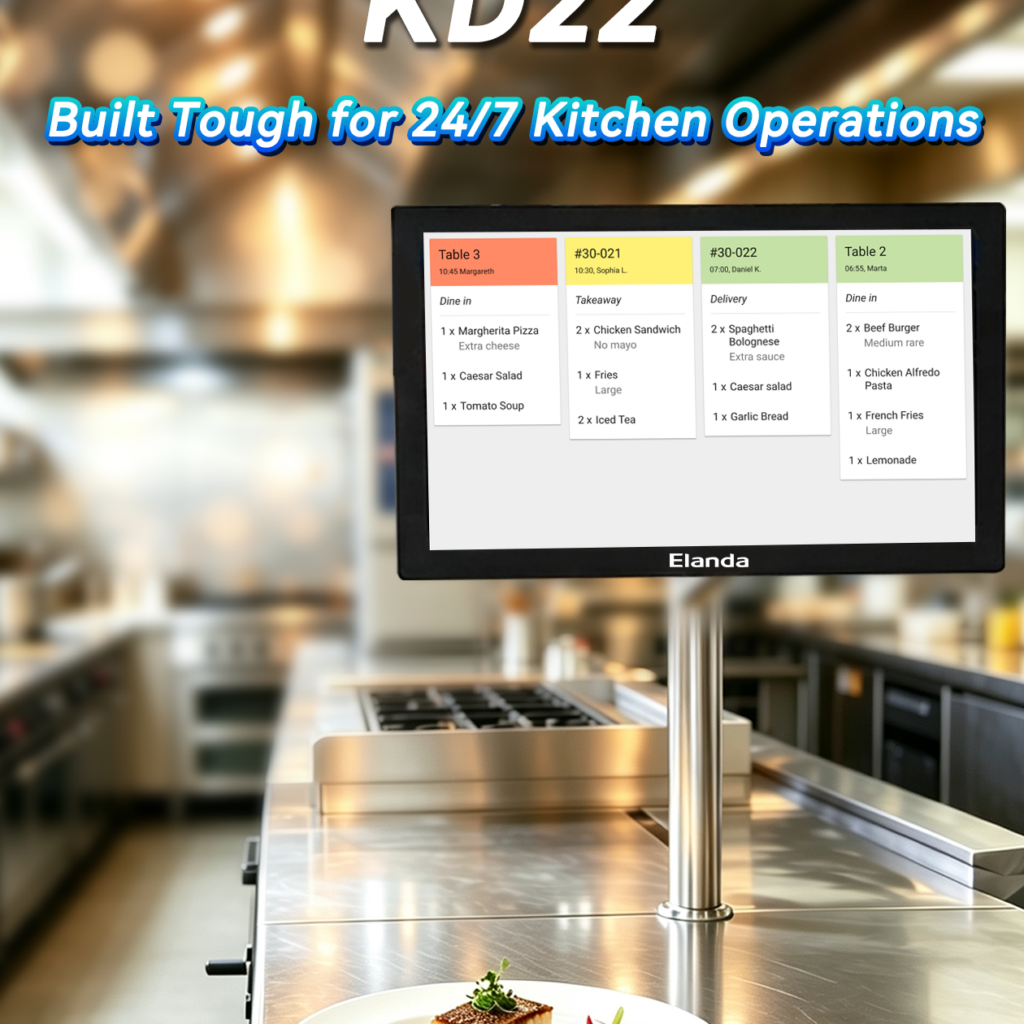
1. What Is a Kitchen Display System?
A Kitchen Display System is a digital order display solution designed to help restaurant kitchens receive, view, and manage incoming food orders. It is commonly used as an alternative or supplement to traditional printed kitchen tickets.
In a restaurant equipped with a compatible POS system, customer orders can be transmitted to a kitchen display screen through integrated software. Kitchen employees can then view order details, identify preparation requirements, and organize their tasks according to the displayed information.
Compared with paper-based order management, a digital kitchen display system can provide a more centralized and visible way to communicate order information. Staff can refer to the screen instead of relying entirely on printed tickets or verbal communication.
Depending on the software platform and system configuration, a KDS may support functions such as:
Displaying incoming customer orders.
Organizing orders by preparation status.
Showing item details and special instructions.
Helping kitchen employees prioritize tasks.
Supporting communication between service counters and kitchen areas.
Providing order status updates through compatible software.
The exact functions depend on the KDS software, POS integration, and selected hardware. Businesses should evaluate the complete system before choosing a suitable solution.
2. How Does a Kitchen Display System Improve Restaurant Operations?
Restaurant operations involve several connected processes, including order taking, payment processing, food preparation, and order delivery. When these activities are not properly coordinated, delays and communication problems may affect service quality.
A Kitchen Display System helps organize kitchen order information in a clear digital format. When connected to a compatible restaurant POS system, it can support a more structured workflow from the moment an order is submitted.
Clearer Order Communication
Digital order displays help kitchen employees view customer orders in one place. This can reduce dependence on handwritten notes and verbal communication, especially when several employees are handling different tasks.
More Organized Kitchen Workflow
A KDS can present incoming orders in a structured format, making it easier for staff to identify pending items and monitor preparation progress. Depending on the software, employees may also be able to update order statuses directly on the screen.
Improved Order Visibility
During busy service periods, kitchen staff need to understand which orders require attention. A kitchen display system provides a visible overview of order information, helping employees coordinate preparation activities.
Support for Faster Service
By organizing order information and reducing unnecessary communication steps, a KDS can help restaurants create a smoother order-handling process. Actual improvements in service speed will depend on staff workflows, kitchen layout, software integration, and operating procedures.
Reduced Dependence on Paper Tickets
Replacing or supplementing printed tickets with digital displays can help restaurants reduce paper usage and maintain a more centralized approach to kitchen order management.
For restaurants aiming to modernize their operations, investing in a suitable restaurant Kitchen Display System can be a valuable part of their digital transformation strategy.
3. Kitchen Display System Applications Across the Food Service Industry
Different food service businesses have different order volumes, kitchen layouts, and service models. A flexible KDS solution can support a variety of restaurant environments when configured according to their specific requirements.
Quick-Service Restaurants
Quick-service restaurants often need to process a high number of orders within a limited period. A Kitchen Display System can help kitchen teams view incoming orders and organize food preparation activities. When integrated with compatible POS terminals or self-ordering kiosks, it can support a more connected ordering process.
Full-Service Restaurants
In full-service restaurants, employees may handle dine-in, takeaway, and delivery orders simultaneously. A digital kitchen display can help organize order details and make communication between service staff and kitchen employees more convenient.
Cafés and Coffee Shops
Cafés often prepare multiple beverages and food items with different customization requirements. A KDS can display order details and special instructions, helping baristas and kitchen staff manage preparation tasks.
Hotels and Hospitality Businesses
Hotels may operate restaurants, cafés, room service departments, and other food service facilities. A suitable kitchen display solution can help organize orders within individual service areas, depending on the software and system configuration.
Food Courts and Multi-Station Kitchens
Food courts and larger kitchens may have several preparation stations responsible for different menu categories. With appropriate software integration, orders can be directed to relevant kitchen displays to support task distribution and coordination.
By selecting the right Kitchen Display System for their operating environment, businesses can build a more organized process for handling daily orders.
4. Integrating KDS with POS Systems and Self-Service Kiosks
A Kitchen Display System is often most effective when it works as part of a connected restaurant technology environment. POS terminals, self-service kiosks, and KDS equipment can perform different roles while supporting the same order management process.
A typical workflow may begin when a customer places an order through a restaurant POS terminal or a compatible self-service kiosk. The order is then processed by the connected software and transmitted to the appropriate kitchen display. Kitchen staff can view the order information and prepare the selected items.
Depending on the software integration, order status updates may also be shared with other parts of the system. This can help front-of-house employees understand the progress of an order and coordinate customer service more effectively.
For restaurants planning an integrated setup, several points should be considered:
POS compatibility: Confirm that the KDS works with the existing POS software and terminal configuration.
Order routing: Determine whether orders need to be displayed on one screen or distributed across multiple kitchen stations.
Software integration: Check how order information is transmitted and whether status updates are supported.
Peripheral requirements: Consider any additional hardware needed for the intended installation.
Future expansion: Evaluate whether the system can accommodate additional terminals, service areas, or kitchen stations.
Elanda focuses on POS Systems, Self-Service Kiosks, Kitchen Display Systems, and peripherals. This product portfolio gives customers multiple hardware categories to consider when planning their commercial POS and restaurant technology projects.
5. What Should You Consider When Choosing a Kitchen Display System?
Selecting the right Kitchen Display System requires more than comparing screen sizes or product prices. Businesses should evaluate their operational requirements and confirm that the selected hardware is suitable for the intended software and kitchen environment.
Display Size and Readability
Kitchen employees need to view order information quickly while performing their daily tasks. The screen size and display quality should be appropriate for the installation distance, available space, and kitchen lighting conditions.
Hardware Performance
The selected KDS hardware should support the software application and workload required by the restaurant. Buyers should check relevant specifications, including processor, memory, storage, and operating system compatibility where applicable.
Connectivity and Compatibility
A KDS needs to communicate with the restaurant’s order management system. Before purchasing, businesses should confirm network connectivity, available interfaces, software requirements, and compatibility with existing POS equipment.
Installation Environment
Restaurant kitchens can be busy working environments. Buyers should consider where the display will be installed, how it will be mounted, and whether the selected equipment is suitable for the surrounding conditions. Environmental protection and cleaning requirements should be verified against the product specifications.
Maintenance and Technical Support
Commercial equipment is part of daily business operations, so convenient maintenance and responsive supplier communication are important. Businesses should understand the available technical support arrangements before making a purchasing decision.
By reviewing these factors, restaurants can select a KDS solution that better matches their kitchen workflow and long-term operating requirements.
6. Elanda: A Trusted Kitchen Display System Supplier in China
Founded in 2016, Elanda is a global high-end POS and SCO solution provider based in Shenzhen, China. The company has built a solid reputation in the POS and self-service kiosk industry through its focus on product quality, unique design, and customer support.
As a Kitchen Display System supplier, Elanda serves customers looking for commercial hardware solutions across different industries. Its product portfolio includes four major categories:
POS Systems
Self-Service Kiosks
Kitchen Display Systems
POS Peripherals
These products are used in various application environments, including retail, hospitality, entertainment, banking, logistics, and healthcare.
For food service businesses, Elanda’s KDS and POS hardware categories offer options to explore when planning restaurant order management equipment. Whether customers are developing a new restaurant project, upgrading existing POS hardware, or looking for additional kitchen display equipment, understanding their software and installation requirements is the first step toward selecting suitable products.
Elanda believes that a successful business partnership is built on more than product supply. Fast support, product quality, and a clear understanding of customer requirements are important parts of long-term cooperation.
The company’s core values are Strive, Innovation, Integrity, and Responsibility. These principles guide its approach to product development, customer service, and international business relationships.
7. Why Choose Elanda for Your KDS and POS Hardware Needs?
When sourcing commercial POS equipment, distributors, system integrators, and restaurant technology providers need a supplier that understands different hardware categories and application requirements.
Elanda offers several advantages for customers exploring Kitchen Display System and POS hardware solutions.
Established Industry Experience
Since its establishment in 2016, Elanda has focused on high-end POS and self-service equipment. Its industry experience provides a foundation for serving customers across different commercial applications.
Multiple Product Categories
Elanda offers POS terminals, self-service kiosks, KDS equipment, and related peripherals. Customers can explore different product categories when developing integrated commercial hardware projects.
Commitment to Quality
Product quality is one of Elanda’s key priorities. The company aims to provide reliable hardware with practical designs for different business environments.
Unique Product Design
Commercial equipment needs to combine practical functionality with an appropriate appearance. Elanda emphasizes unique design to meet the expectations of customers in different markets.
Responsive Customer Support
Clear communication is important throughout the purchasing process. Elanda provides fast support to help customers understand product options and discuss their business requirements.
Global Business Orientation
Located in Shenzhen, China, Elanda serves international customers and continues to strengthen its global brand presence. Its products support a variety of industries and commercial applications.
8. Find the Right Kitchen Display System for Your Restaurant
An efficient kitchen workflow is essential for providing consistent service and managing daily restaurant orders. A suitable Kitchen Display System can help kitchen employees view order information, organize preparation tasks, and coordinate with front-of-house staff.
When combined with compatible POS terminals and self-service kiosks, KDS equipment can become part of a more connected restaurant technology environment.
As a high-end POS and SCO solution provider founded in 2016, Elanda offers Kitchen Display Systems, POS Systems, Self-Service Kiosks, and peripherals for customers across multiple industries. With a focus on product quality, unique design, and fast support, Elanda is committed to helping customers explore suitable commercial hardware solutions.
If you are searching for a reliable Kitchen Display System supplier or looking to expand your restaurant POS hardware portfolio, Elanda is ready to discuss your requirements.
Visit the official website to explore more products and solutions:
Website: https://www.elandapos.com/
Choose Elanda as your POS hardware partner and explore practical solutions for more organized restaurant operations.
